
Follow-through · 6 min read
How to write a sales follow-up email after a call
What to include, four templates and a checklist before you send.
 auraScribe
Send the auraScribe bot to your Zoom, Google Meet or Teams call, import recordings from Zoom and Google Meet, or record on your device. auraScribe turns your meetings into transcripts, notes, actions and follow-up drafts. Live coaching adds useful questions and help shaping your answers during the conversation.
14-day free trial, no credit card, including 2 hours of live coaching. Live coaching is a beta; Pro+ includes it beyond the trial. Usage allowances apply.
CONVERSATION IN PROGRESS
You are explaining your background and experience.
Illustrate your background with a concrete example rather than a chronological summary.
In this recorded example, the suggestion was to make an answer more concrete. The surrounding interface is illustrative; you decide whether the advice fits your conversation.
Suggestion dismissed.
YOUR CONTEXT, CLOSE AT HAND
Conversation · Documents · Linked contacts
Help during the conversation
Context from your documents
Memory across meetings
Notes and follow-through
A CLOSER LOOK
See Live Coach in the app, then explore your meeting workspace, summaries and actions.
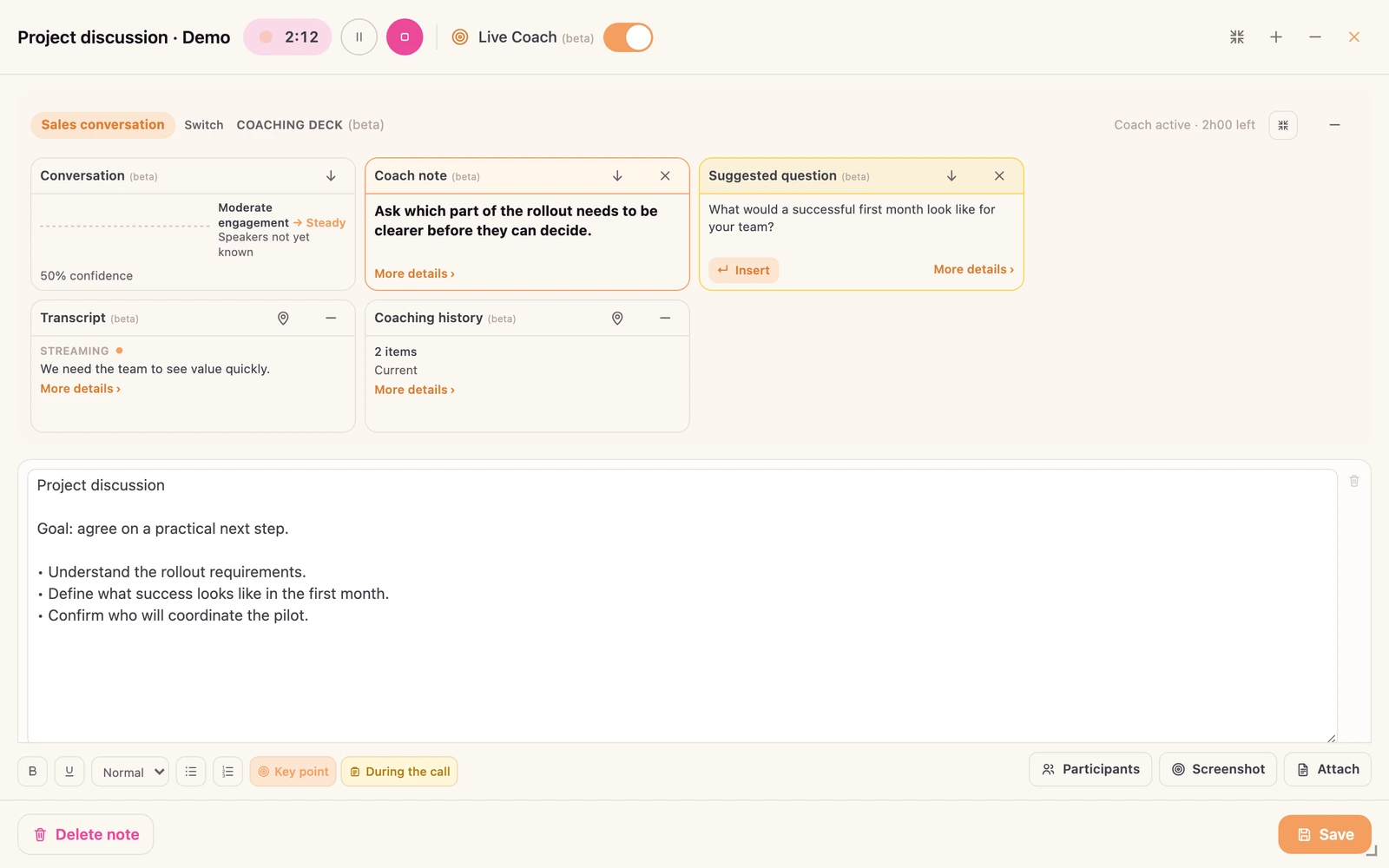
Live Coach shows suggestions and questions alongside your notes during the conversation.
Enlarge screenshot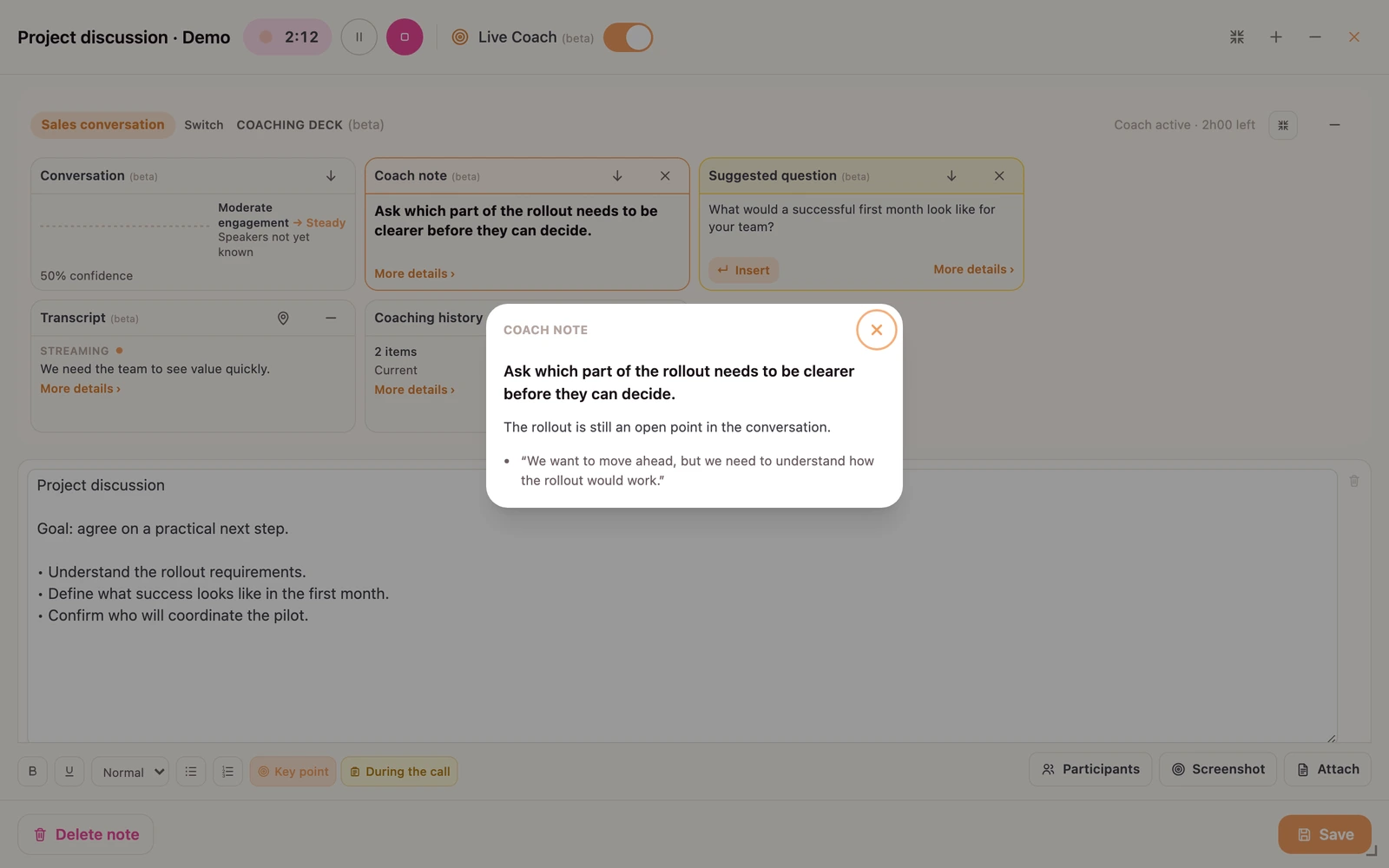
Open a coach note to read its explanation and the supporting conversation excerpt.
Enlarge screenshot
Your meetings, insights and relationships, together in one workspace.
Enlarge screenshot
Return to the key points and the people behind the conversation.
Enlarge screenshot
Turn the discussion into actions you can review and follow through.
Enlarge screenshot
Reflect on your communication strengths and what to practise next.
Enlarge screenshotReal app screens · English demo content.
01 / IN THE MOMENT
You are carrying the conversation. auraScribe helps you notice the point left open, organise an answer and find a useful next step.
01
Clarify an unanswered question or bring a missed requirement into the discussion.
02
Organise the points raised and use relevant details from the material you provide.
03
Read a short suggestion. Open its details and supporting evidence when available.
02 / YOUR CONTEXT
Bring the people, documents and history behind the conversation. Give your coach something useful to work with.
auraScribe Live Coach 03 / AFTER THE CALL
REMEMBER
Review the transcript and summary, connected to the people involved.
ACT
Organise actions and review follow-up drafts based on the discussion.
IMPROVE
Review your communication strengths and what to practise next.
04 / CAPTURE
auraScribe works with Zoom, Google Meet and Microsoft Teams. Let the meeting bot join, import the recording from your connected account, or record on your own device. Whichever you choose, you get the same transcript, analysis and follow-through.
MEETING BOT
Paste a link, or connect your Google or Microsoft calendar and enable automatic bot invitations. Available on Pro and Pro+; the host may need to admit the bot.
INTEGRATIONS
Connect your accounts to import meeting recordings after the call. Your provider plan, permissions and recording settings determine what is available.
YOUR DEVICE
Record a call on your Mac or in a supported desktop browser with audio sharing enabled. Use the iOS or Android app to record a meeting in the room.
FILES
Upload audio or video, or import from Google Drive, for the same transcript and analysis.
Let people know when you record, and follow the consent rules that apply to you.
EVERYTHING IN AURASCRIBE
THE CONVERSATION JOURNAL
Follow-through · 6 min read
What to include, four templates and a checklist before you send.
Meeting notes · 8 min read
Choose a workflow that fits your meeting.
Interviews · 7 min read
Capture evidence, decisions and next steps.
auraScribe asks for access to a Google service only when you choose a feature that needs it, and uses that data only to provide the feature.
You pick audio or video files with Google Picker on the web, or from an in-app read-only Drive list in the iOS and Mac apps. auraScribe imports only the files you pick so it can copy them to your private storage path and run transcription and analysis.
You pick a destination folder. auraScribe creates only the transcript, notes, or optional audio export files you ask it to save.
If you connect Google Meet, auraScribe reads the conference records and transcript entries of your own past meetings and downloads the recording Google Meet saved in your Drive for each meeting you import.
When you start a contact import and choose Google, auraScribe reads your contacts (names, email addresses, phone numbers, organisation), read-only, to let you import them and match them to meeting speakers.
If you connect Google Calendar, auraScribe and our meeting-bot provider read your events, including attendees' names and email addresses, read-only, to send the note-taking bot to the meetings you choose. The provider keeps a copy of your events while the calendar is connected; disconnecting deletes it. We never create, change or delete calendar events.
Google user data is used only to provide these features. It is not sold, not used for advertising, not used to determine creditworthiness and not used to train AI models.
auraScribe's use and transfer of information received from Google APIs adheres to the Google API Services User Data Policy, including the Limited Use requirements.
Read the Privacy Policy ↗A FEW USEFUL ANSWERS
Useful questions, clearer answers and next steps during a conversation. You choose which advice to use.
You can bring linked contacts, relationship context and recent summaries, alongside documents you choose to add.
Yes. Transcripts, summaries, actions and follow-up drafts remain part of auraScribe. Available features depend on your plan.
Zoom, Google Meet and Microsoft Teams. The meeting bot joins from a link or your connected calendar (Pro and Pro+). You can also import Zoom and Google Meet recordings, record a call on your computer, or record in person with the iOS and Android apps.
Yes. Connect your accounts to import recordings that Zoom or Google Meet made available after a meeting. The provider must have created the recording, and your account must have access to it. For Microsoft Teams, connect your Microsoft calendar and enable automatic bot invitations, or paste a meeting link. The host may need to admit the bot.
Yes, 14 days with no credit card, including 2 hours of live coaching, counted within the trial's usage allowance. Pro+ includes live coaching beyond that. It is a beta, with usage allowances.
